Posts

Prototype.js - Useful Methods

Method Description $() If provided with a string, returns the element in the document with matching ID; otherwise returns the passed element. $$() Takes an arbitrary number of CSS selectors (strings) and returns a document-order array of extended DOM elements that match any of them. $A() Converts the single argument it receives into an Array object. $F() Returns the value of a form control. This is a convenience alias of Form.Element.getValue. $H() Converts objects into enumerable Hash objects that resemble associative arrays $R() Creates a new ObjectRange object. $w() Splits a string into an Array, treating all whitespace as delimiters. Try.these Accepts an arbitrary number of functions and returns the result of the first one that doesn't throw an error.
Blackberry Resource File Creation and Calling Method

(1) On the File menu , click New > Other. (2) In the New dialog box, expand the BlackBerry item . (3) Click BlackBerry Resource File . (4) Click Next. (5) In the Create a new BlackBerry Resource File dialog box, click the project folder for the BlackBerry device application. (6) In the File name field , type the name of the .rrc file or .rrh file. (7) Click Finish . Calling Method: public static ResourceBundle _res = ResourceBundle.getBundle (stringsResource.BUNDLE_ID,stringsResource.BUNDLE_NAME); private String valueText = ClassName._res.getString (stringsResource.stringValue); // stringsResource means fileName(strings)+Resource //  BUNDLE_ID and  BUNDLE_NAME both are default.

Blackberry SubMenu Creation and Calling Method

// creating menu and submenus SubMenu menu = new SubMenu(); SubMenu sMenu = new SubMenu(); menu.add(new SubMenuItem("MenuName", sMenu));  //menu is main Menu  //u have to call from where ever you want Ui.getUiEngine().pushScreen(menu);

Blackberry - SubMenu

class SubMenu extends PopupScreen implements ListFieldCallback { private static final int MAX_WIDTH = Font.getDefault().getAdvance( "max menu item text"); XYRect mRectangle = new XYRect(); Vector mSubMenuItems = new Vector(); ListField mListField; public SubMenu() { super(new SubMenuItemManager(), DEFAULT_CLOSE); int rowHeight = getFont().getHeight() + 2; mListField = new ListField() { protected boolean navigationClick(int status, int time) { runMenuItem(getSelectedIndex()); return super.navigationClick(status, time); } }; mListField.setRowHeight(rowHeight); add(mListField); mListField.setCallback(this); updateMenuItems(); } public void add(SubMenuItem subMenuItem) { mSubMenuItems.addElement(subMenuItem); subMenuItem.mMenu = this; updateMenuItems(); } private void updateMenuItems() { int rowCounts = mSubMenuItems.size(); mRectangle.width = getMaxObjectToStringWidth(mSubMenuItems); mRectangle.height = mListField.getRo...

Blackberry Custom Image Field with active and normal Images

public class ImageField extends BitmapField { Bitmap mNormal; Bitmap mFocused; Bitmap mActive; int mWidth; int mHeight; public ImageField(Bitmap normal, Bitmap focused, Bitmap active, long align) { super(active, align | ImageField.FOCUSABLE); mNormal = normal; mFocused = focused; mActive = active; mWidth = mFocused.getWidth(); mHeight = mFocused.getHeight(); } protected void paint(Graphics graphics) { Bitmap bitmap = null; switch (getVisualState()) { case VISUAL_STATE_NORMAL: bitmap = mNormal; break; case VISUAL_STATE_FOCUS: bitmap = mFocused; break; case VISUAL_STATE_ACTIVE: bitmap = mActive; break; default: bitmap = mNormal; } graphics.drawBitmap(0, 0, bitmap.getWidth(), bitmap.getHeight(), bitmap, 0, 0); } public int getPreferredWidth() { return mWidth; } public int getPreferredHeight() { return mHeight; } protected void layout(int width, int height) { setExtent(mWidth, mHeight); } }

Blackberry Vertical Layout Size and Vertical Scrollbar

VerticalFieldManager myLayout = new VerticalFieldManager (VerticalFieldManager.FIELD_LEFT | VerticalFieldManager.FOCUSABLE | VerticalFieldManager.USE_ALL_WIDTH| VerticalFieldManager.VERTICAL_SCROLL|VerticalFieldManager. VERTICAL_SCROLLBAR){ protected void sublayout(int maxWidth, int maxHeight) { int setWidth = Display.getwidth -20; int setHeight = Display.getHeight -130; super.sublayout(setWidth, setHeight); } };

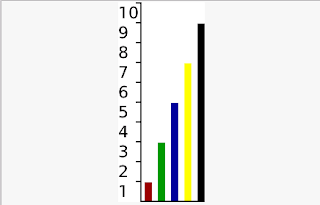
Blackberry Bar-Graph Field & Output

Image
Pass the values to Bar-Graph Field VerticalFieldManager graphLayout = new VerticalFieldManager( VerticalFieldManager.FIELD_HCENTER); // Graph BarGraphField _barGraph = new BarGraphField(values, colors, 10, 1, 10, BarGraphField.PADDING_MEDIUM, BarGraphField.PADDING_MEDIUM,true); _barGraph.setPadding(2, 10, 5, 10); graphLayout.add(_barGraph); Output:

Blackberry Bar-Graph (Class 2)

import net.rim.device.api.ui.Font; import net.rim.device.api.ui.Graphics; import net.rim.device.api.util.Arrays; /** * A field that can display data in a bar graph format. */ public class BarGraphField extends GraphField { /** * * Use no padding. */ public static final int PADDING_NONE = 0; /** * * Use low padding. */ public static final int PADDING_LOW = 4; /** * * Use medium padding. */ public static final int PADDING_MEDIUM = 8; /** * * Use high padding. */ public static final int PADDING_HIGH = 12; private int _scale, _increment, _barWidth, _barPadding, _scalePadding; private boolean _showScale; /** * * Constructs a bar graph using the default (PADDING_MEDIUM) padding without * scale labels. * * @param values * The values (data) to be graphed. * @param colors * The colors used to draw each bar. * @param scale * The maximum possible value of the graph, the top scale value. * @param increment * The increment a...

Blackberry Bar-Graph (Class 1)

import net.rim.device.api.ui.Field; /** * The base class for which other graph fields are derived from. */ public abstract class GraphField extends Field { /* * The values (data) used to create the graph. */ protected int[] _values; /** * The colors used to display the data sets. */ protected int[] _colors; /** * The width of the field. */ protected int _width; /** * The height of the field. */ protected int _height; /** * Creates a plain empty graph field. */ GraphField() { super(); } /** * Retrieves the color at the specified index. * * @param index * The index of the color. * @return an integer in form 0x00RRGGBB */ public int getColor(int index) { return _colors[index]; } /** * Retrieves an array of colors. * * @return an array of integers in the form 0x00RRGGBB */ public int[] getColors() { return _colors; } /** * Retrieves the value at the specified index. * * @param index * ...